ENEnglish
 LTLietuviškai
 DEDeutsch
 FRFrançais
 RUРусский
 ESEspañol
 PLPolski
 ITItaliano
 UKУкраїнська
 CSČeština
 PTPortuguês
 JA日本語
 LVLatviešu valoda
 ETEesti
 HUMagyar
 IDBahasa Indonesia
 TRTürkçe
 HIहिन्दी
 ELΕλληνικά
 ARالعربية
 THไทย
 VITiếng Việt
 RORomână
 MSBahasa Melayu
 BNবাংলা
Short answer: A startup can use AI Blog Autopilot to publish a steady blog and share every article to its social networks without hiring a content team. Start with the three free articles, give the product clear topics, audience and tone, begin on Starter at 19 euros a month, keep approval on until you trust the output and move up only when you can review more.
Early-stage teams have a familiar problem. Everyone agrees that content matters, because customers search before they buy and investors look at the website. But the founders are building the product, the first hires are engineers and nobody has a free afternoon to write a weekly article. The blog starts with enthusiasm, produces three posts and goes quiet.
This guide shows how a startup can use AI Blog Autopilot as a content engine, step by step. The product facts come from the home page and pricing page. Anything about your company is yours to decide, so treat the advice as a plan to adapt.
Why startups struggle to keep a blog going
The cause is rarely lack of ideas. It is lack of routine. Writing a 2,000-word article takes hours, review takes more, and sharing it on several networks takes another slice of the afternoon. When a launch, a bug or a customer call appears, the blog is the first thing to give way.
A second problem is consistency of voice. When founders, a freelancer and an intern all write, the blog reads like four different companies. Readers and search engines notice a site that changes tone and topic from week to week.
The third problem is cost. A good writer or agency is a real expense, and a startup that has not yet found its market rarely wants a long contract for content. A tool with monthly credits that do not roll over, cancellable at any time, as the pricing page states, fits an uncertain budget better.
What Autopilot gives a small team
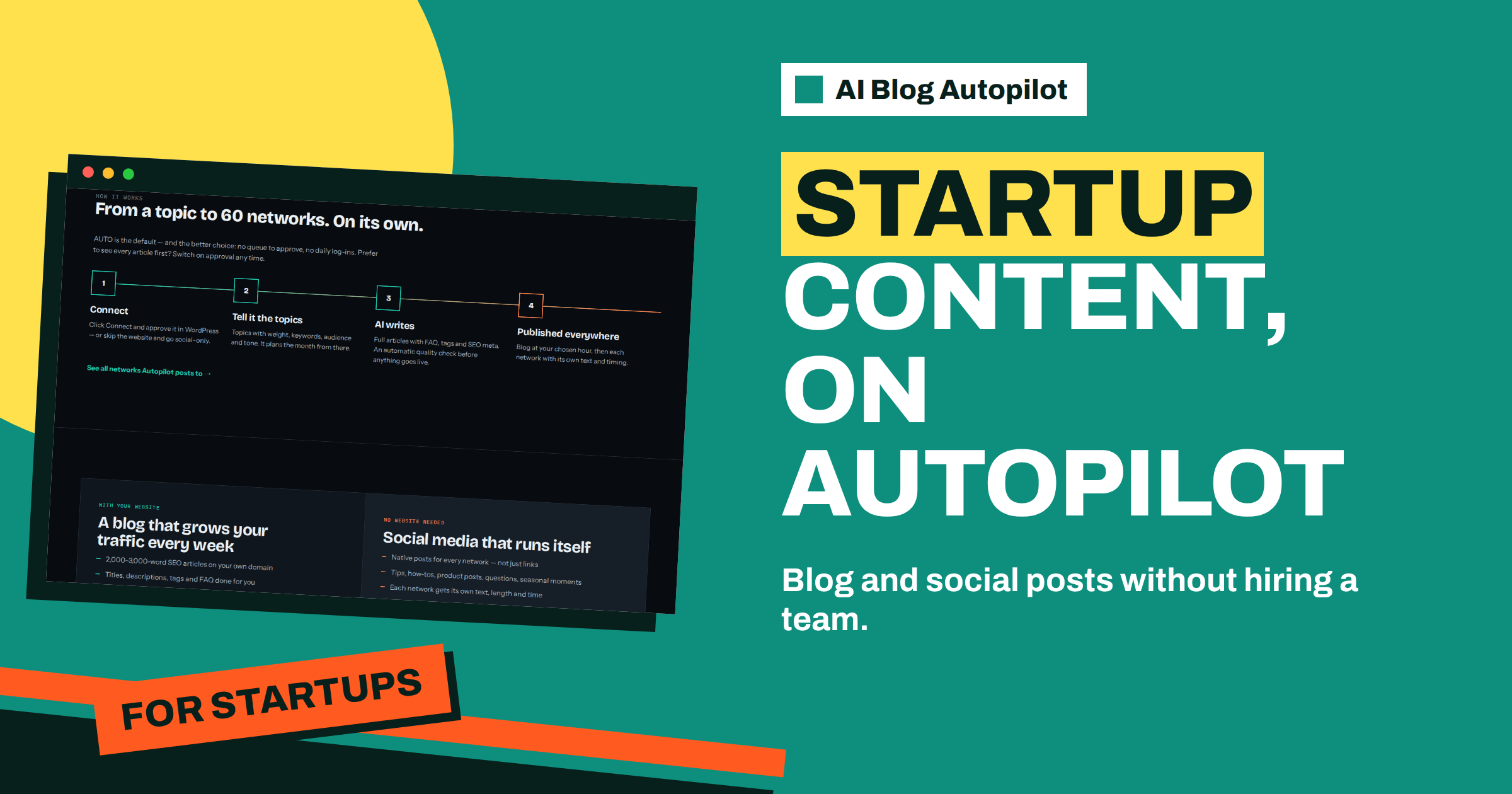
The home page describes four steps. You connect your WordPress site with a click, or skip the website and go social-only. You tell Autopilot the topics, with weight, keywords, audience and tone. The AI writes full articles with FAQ, tags and SEO meta, followed by an automatic quality check. Then the blog publishes at your chosen hour, and each network gets its own text and timing.
The articles run to 2,000 to 3,000 words, in 25 languages written natively. AUTO is the default mode, so there is no queue to approve and no daily log-in, although you can switch on approval whenever you wish. The quality gate checks length, structure, keyword and meta, and the page says weak articles wait for you instead of going live.
For a small team, this means the routine lives in the product, not in somebody’s calendar. The founder spends time on the brief and on review, not on drafting and posting.
Step one: write a brief that sounds like your company
Before you create an account, spend an hour on a one-page brief. Describe what the company does in two sentences, who the customer is and what problem you solve. List five to eight topics your customers care about, ranked by importance. Add the keywords people use when they search for your kind of solution, and a few phrases you never use.
Decide on tone. A developer tool may suit a plain, practical voice. A consumer app may want something warmer. Write three example sentences in the style you want and three you want to avoid. This is the document that keeps early articles on brand. The article on how to write a content brief for AI offers a template.
Add facts the writer must respect: product names, features that exist, features that do not exist yet. Early-stage products change quickly, and an article that describes a feature you dropped last month does damage. Keep this fact sheet up to date.
Step two: use the three free articles as a test
The home page says the first three articles are free and need no card. Use them as a proper trial. Pick three topics from your list: one about a customer problem, one about a comparison or choice and one about how your approach works.
Read each article as a sceptical customer would. Is it accurate? Does it sound like you? Would you be happy to see it ranking? Mark what to change in the brief, not in the article, because the brief shapes all the following ones. The article on what to do with the first three free articles gives a short scoring sheet.
If the result is close, you have a working engine. If it is far off, the cause is almost always the brief: too general, missing facts or unclear about the reader. Fix it and test again before paying.
Step three: choose the starting plan
The pricing page lists the plans. Starter costs 19 euros a month and includes 8 articles, 1 website, 5 social networks and 1 language. Growth costs 49 euros and includes 30 articles, 2 websites, all 60 social networks, 3 languages and evergreen reshares. The Social plan, at 15 euros, offers 60 social posts a month with no website needed.
Most startups should begin with Starter. Eight articles a month is two a week, which is a healthy rhythm for a new blog and leaves room for founders to review each one. Growth makes sense when you have a team member who can review more, or you want more than one language or website.
Remember that credits are monthly and do not roll over, according to the pricing page, so plan to use them. The article on choosing an AI Blog Autopilot plan compares the options in detail.
Step four: connect and set the rhythm
Connect your WordPress site with a click and approve it in WordPress, or paste an application password manually, as the home page describes. Check that the connection is healthy, then choose the hour the blog should publish. Early mornings in your main market are a sensible default, and you can adjust after a month.
Connect the social networks that your customers actually use. A business-to-business software company may start with LinkedIn and X, while a consumer app may prefer Facebook, Pinterest or Telegram. The home page says each network gets its own text, length and time, so you do not need to write variants by hand.
Keep approval on for the first month. Read every article and every social post, then switch to AUTO when you trust the result. The article on moving from approval to AUTO in four weeks gives a calendar.
What to write about when the product is new
Early-stage companies often struggle to pick topics because they have few customers to ask. Start with the questions you hear in sales calls and support emails. Add the problem your product solves, described without product names, since people search for the problem before they know a solution exists.
Add comparisons carefully. Buyers search for alternatives, and an honest article that explains who each option suits can earn trust. Do not attack competitors, and do not claim things you cannot prove. Add how-to guides that use your product, since they show it in action.
Weight your topics. The home page says you give each topic a weight, so give the highest weight to subjects that match your best customers. Review the weights after a month, based on which articles get read and which questions customers still ask.
Consider a short story. Two founders build scheduling software for dental clinics. They have no marketer and spend their days on code and calls. They write a brief in one afternoon with six topics: reducing missed appointments, reminder wording, handling emergency slots, comparing booking methods, onboarding a new clinic and data protection basics. They use the three free articles, rewrite the brief twice and then choose Starter. For a month, one founder reads each article on Friday for twenty minutes and corrects any product detail. In the second month they switch to AUTO and check the content map weekly. The blog is no longer an item on a to-do list; it simply happens.
The lesson is that effort moves from drafting to briefing. A good brief takes hours once, and saves hours every week afterwards.
Measure what matters and avoid common mistakes
Do not expect a startup blog to deliver leads in the first month. Search takes time. Track a few simple signs: articles published, pages that earn impressions, questions customers mention that came from an article and sign-ups that began on the blog. Review them monthly with the team.
Common mistakes are easy to avoid. Do not skip review in the first month. Do not write topics so general that they could belong to any company. Do not leave outdated product facts in the brief. Do not buy a bigger plan than you can review. And do not judge the engine on a single article; judge it on the first ten.
A simple first-quarter timeline
A timeline keeps the effort small and the progress visible. In week one, write the brief, the fact sheet and the topic list, then use the three free articles. In weeks two to four, run on approval, read everything and adjust the brief after each article. In month two, keep approval for the social posts if you wish, but let the blog move to AUTO once the first eight articles needed few corrections.
In month three, look at the content map, count what went out and compare it with the plan. Check which topics produced the most reading time and which questions customers still ask in sales calls. Move weight towards the first group and write a new topic for the second. By the end of the quarter you should have around two dozen articles, a steady social presence and a clear view of whether to stay on Starter or move up.
Keep one person responsible. In a small team, a task that belongs to everyone belongs to nobody. Name the owner of the brief, the weekly review and the monthly check, even if it is the same founder each time.
How AI Blog Autopilot helps
The product gives a small team a routine: a brief, a quality check, a blog on your chosen hour and posts on each network, with approval when you want it and AUTO when you trust it. Try it with the three free articles on AI Blog Autopilot, no card needed, and see the plans on the pricing page.
Related reading
- Choosing an AI Blog Autopilot Plan: Social to Agency
- The First Three Free Articles: How to Use Them Well
- What Eight Articles a Month Can Do on the Starter Plan
The bottom line
A startup should write a one-page brief, test with the three free articles, begin on Starter, keep approval on for the first month and then let AUTO run while the founders check the content map weekly.
الأسئلة الشائعة
Is AI Blog Autopilot suitable for a very small startup?
Yes. The Starter plan lists 8 articles a month for 19 euros, and credits are monthly with cancellation at any time.
Can I try it before paying?
The first three articles are free with no card, so you can test the brief before choosing a plan.
What if my product changes often?
Keep a fact sheet in your brief and update it. Approval can be switched on at any time if you want to check each article.
Do I need a website to start?
No. The Social plan works without a website, and you can add a blog later with your plan moving with you.
When should I move to Growth?
When you can review more than eight articles a month, or you need 2 websites, 3 languages or evergreen reshares.