ENEnglish
 LTLietuviškai
 DEDeutsch
 FRFrançais
 RUРусский
 ESEspañol
 PLPolski
 ITItaliano
 UKУкраїнська
 CSČeština
 PTPortuguês
 JA日本語
 LVLatviešu valoda
 ETEesti
 HUMagyar
 IDBahasa Indonesia
 TRTürkçe
 HIहिन्दी
 ELΕλληνικά
 ARالعربية
 THไทย
 VITiếng Việt
 RORomână
 MSBahasa Melayu
 BNবাংলা
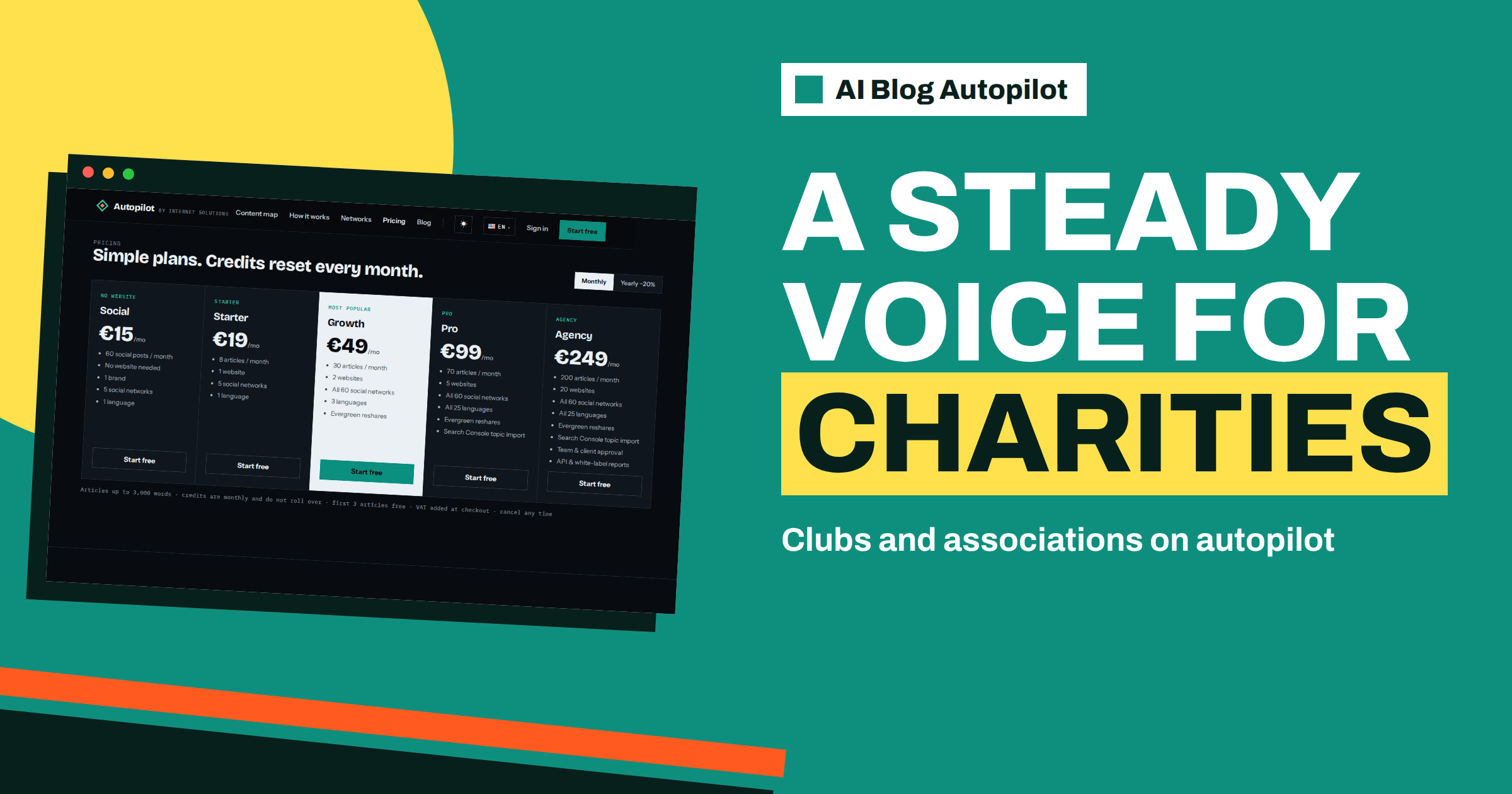
Short answer: a charity, club or association can use AI Blog Autopilot to keep a steady stream of articles and posts without a communications team. Start on a small plan, such as Starter at 19 euros for 8 articles or Social at 15 euros for 60 posts, keep approval on with a named volunteer reviewer, keep a shared fact sheet and make sure every article says clearly how to join, give or get involved.
Organisations run by volunteers share a familiar pattern. Communication depends on one enthusiastic person, who eventually moves on, and the blog and social pages go quiet. Meanwhile, members, donors, local residents and the press look for current information, and an out-of-date website suggests that the organisation is inactive, even when it is thriving.
This guide explains how a small non-profit organisation can use the product to keep a steady voice, how to organise review among volunteers, how to protect accuracy and privacy and how to measure whether it helps. Plan facts come from the product’s pricing and home pages. Rules about fundraising and data protection differ by country, so check the guidance that applies to you.
What a steady voice does for an organisation
A regular blog tells the world what you do, who you help and how to take part. It answers the questions people ask before they join, donate or volunteer: what happens at a session, how much it costs, who can come and what the money is used for. It builds the trust that a donation or a commitment needs.
It also preserves knowledge. Articles about how events are organised, what a typical week looks like and how members can contribute are useful to newcomers and a record for the organisation. When volunteers change, the library of articles remains.
Regularity matters as much as brilliance. A few lines each week keep an organisation visible, while a splendid post once a year does not. The article on a nonprofit blog strategy covers the thinking, and the article on a sports club blog gives topic ideas for clubs.
Which plan fits a small budget
Budgets are tight, so choose carefully. The pricing page lists Social at 15 euros a month, with 60 social posts, no website needed, 1 brand, 5 networks and 1 language. It lists Starter at 19 euros, with 8 articles, 1 website, 5 networks and 1 language. Growth costs 49 euros and lists 30 articles, 2 websites, all 60 networks, 3 languages and evergreen reshares.
If you have no website, or your website is a single page, Social is a low-cost way to keep your pages active. If you have a website that deserves news and guides, Starter gives eight articles a month, which a volunteer team can realistically review. Do not take more than you can check, since credits are monthly and do not roll over.
Check whether the product offers any special terms for non-profits, by looking on the pricing page and contacting the team through the site if needed. The page itself lists no such discount, so do not assume one exists. The first three articles are free and need no card, so you can test before the committee commits any money.
Organise review among volunteers
The home page says AUTO is the default and approval is optional. For an organisation, approval is wise: your reputation and your relationships with members, donors and beneficiaries depend on accuracy and tone. Name one person as the reviewer, and one as a deputy, so that publication does not stop when someone is away.
Agree what the reviewer checks. Are dates, times and places right? Are names spelled correctly? Does the article say anything about money that has not been approved? Does it respect the privacy of members and beneficiaries? Does the tone fit the organisation? Write the checklist on one page, and keep it with the fact sheet.
Share the work. A small group of three or four people who each review one article a week spreads the load, and a rota avoids burnout. Use a shared document or a simple chat channel to record decisions. The article on approving social posts before they go out describes a simple workflow.
A shared fact sheet
The product plans from topics, with weight, keywords, audience and tone, and it writes with instructions never to make up statistics, quotes or sources. It cannot know your meeting times, your committee, your fees or your aims unless you tell it. A shared fact sheet is the best protection.
Include the organisation’s mission in two sentences, the services or activities, times and places, how to join or donate, contact details, the names and roles of key people and any rules the organisation follows. Add a list of things the articles must not say, such as promises about results, comments about other organisations and claims about how funds are spent that have not been confirmed by the treasurer.
Keep it current, and give one person the job of updating it after each committee meeting. A fact sheet that is a year old creates errors. The article on conflicting facts across your pages explains why consistency matters.
Topics that suit organisations
Good topics answer the questions of different audiences. For potential members: what to expect at a first visit, what equipment or skills are needed, how to join. For donors: how to give, what donations achieve in general terms and how the organisation is run. For volunteers: what roles exist, how much time they take and how to start.
For the community: news about events, results, achievements and thanks. For the wider public: guides on the organisation’s subject, such as how to start a hobby, how to look after a local habitat or how to help a neighbour. These guides bring readers from search who are not yet connected to you.
Avoid stories that identify beneficiaries unless you have clear permission. Think about children and vulnerable people with special care. If in doubt, leave it out. Use weights to give more room to the topics that matter most this season, such as an annual appeal or a membership drive.
Networks that fit an organisation
Choose the places where your members and supporters already are. Many clubs and associations use a general social network for the community, a messaging channel for members and a photo network for events. The networks page lists social networks, messaging channels, team chats, publishing platforms and read-later tools, and says each network gets its own text and timing.
A team chat or messaging channel can help coordinate volunteers as well, and the product can post new articles there. The article on choosing social networks for a blog explains how to decide.
Keep the number small. Five networks is the limit on Starter and Social, and few volunteer teams can follow up on more. Decide who answers messages and comments on each network, because an unanswered question looks careless.
Privacy, consent and care
Non-profit organisations hold personal data about members, donors and beneficiaries, and the law in many places is strict. Keep personal data out of the product and out of articles. Describe activities in general terms. When you publish photos or names, check that you have the necessary consent, and be especially careful with children.
Do not use the product to message people who have not opted in. Public posts and open channels are fine, but private lists need consent. If you run a membership email list, keep it separate and follow the rules for it.
Be transparent about automation if your organisation values that. Some supporters like to know how content is produced, and a short note on your about page costs little. The article on who owns AI-written blog content covers related questions.
A year for a small association, and how to measure it
Imagine a local rowing club with a hundred members and no paid staff. The secretary agrees to be the reviewer, the treasurer is the deputy and a coach supplies facts. In September, the club publishes guides for new members: what to bring, how sessions work and how to join. In October and November, it focuses on winter training and the indoor programme. In spring, the topics turn to the regatta, volunteering at the event and thanking sponsors.
Each month, the secretary spends an hour on the articles and ten minutes a day on comments. The coach updates the fact sheet after each committee meeting. When the secretary steps down, the new one inherits the fact sheet, the checklist and the log of corrections, and the voice of the club does not change. That continuity is the real gain: the organisation’s communication no longer depends on one person’s energy.
For an organisation, success is not traffic but participation. Look at new members, enquiries, volunteers, event sign-ups and donations, and ask people how they found you. Track which articles are mentioned. Look at your analytics for visits to the pages about joining and giving.
Review every quarter. Which topics brought people in? Which networks work? What questions do people keep asking that the blog does not answer? Report the findings to the committee in a short note. Seeing results helps the committee support the work, and the notes preserve knowledge for the next volunteer.
Make one more provision for succession. Keep the login details for the product and the website with the organisation, not with an individual, in the way the committee normally handles shared accounts. Record who has access and review it at each annual meeting, so that a departing volunteer never takes the keys with them by accident.
How AI Blog Autopilot helps
The product writes, publishes and shares on a schedule, so a small team can keep a steady voice while volunteers focus on the cause. Try the three free articles on AI Blog Autopilot, no card needed, and compare plans on the pricing page.
Related reading
- A Nonprofit Blog Strategy
- A Blog for a Sports Club or Community Association
- Approving Social Posts Before They Go Out
The bottom line
Start small, keep approval with named volunteers, share a current fact sheet, protect privacy and measure participation, so the organisation keeps a steady voice whoever is on the committee.
BUJ
Which plan suits a small club?
Social lists 60 posts for 15 euros with no website, and Starter lists 8 articles and 1 website for 19 euros.
Does the product offer non-profit pricing?
The pricing page lists no such offer, so do not assume one. Contact the team through the site if you want to ask.
Who should approve the content?
A named volunteer reviewer with a deputy, using a short checklist and a shared fact sheet.
Can we include photos and names of members?
Only with proper consent. Keep personal data out of the product and be especially careful with children.
How do we measure success?
By participation, such as new members, volunteers, sign-ups and donations, not only by visits.