ENEnglish
 LTLietuviškai
 DEDeutsch
 FRFrançais
 RUРусский
 ESEspañol
 PLPolski
 ITItaliano
 UKУкраїнська
 CSČeština
 PTPortuguês
 JA日本語
 LVLatviešu valoda
 ETEesti
 HUMagyar
 IDBahasa Indonesia
 TRTürkçe
 HIहिन्दी
 ELΕλληνικά
 ARالعربية
 THไทย
 VITiếng Việt
 RORomână
 MSBahasa Melayu
 BNবাংলা
Short answer: Before you click Start free on AI Blog Autopilot, prepare six things: a short business description, five to eight topics with keywords, an audience and tone, WordPress access or a decision to start social-only, a list of networks and languages, and a review habit. An hour of preparation makes the three free articles far more useful.
The home page makes starting look easy, and it is: connect, give topics, let the AI write, publish everywhere. But the quality of what comes out depends on what you put in. Many people sign up, rush through the brief and judge the product by articles written from a vague description. A short checklist avoids that.
This guide walks through what to prepare, in the order that saves most time. The product facts come from the home page, the networks page and the pricing page. Choices about your business are yours; use the checklist to make them deliberately.
Write a short description of the business
Start with two or three sentences that a stranger could understand: what you sell, to whom and where. Add what makes you different, and what you do not do. A clear description prevents the writer from drifting into topics that look related but are not your business.
Include the details that matter to customers: locations, opening hours, delivery areas, languages you serve, certifications and price positioning. If you want to avoid quoting prices in articles, say so. The home page says the writer is instructed never to make up statistics, quotes or sources, but it can only use facts you have supplied or that are general knowledge.
Keep a separate list of facts that must be exact: product names, service names, guarantees and policies. This is your fact sheet. Update it whenever something changes, so that a new article does not repeat an outdated claim.
Choose topics, keywords and weights
The home page says you give Autopilot topics with weight, keywords, audience and tone, and it plans the month from there. Prepare five to eight topics that matter to your customers. For each, add a few keywords, the way real people describe the subject.
Then give each topic a weight. A topic that brings customers directly, such as a service you want to sell, deserves more weight than a background topic. Do not give every topic the same weight, since that tells the planner nothing about what matters.
Gather real questions too. Ask your sales and support colleagues which questions come up most. Check the autocomplete suggestions in a search engine and, if you have a site, your own search console. The article on setting up topics in Autopilot goes deeper into weights and keywords.
Describe your audience and tone
Write who you want to reach: their role, their knowledge level and what they want to achieve. A guide for a first-time homeowner reads differently from one for a property investor, even on the same subject. The clearer the reader, the more useful the article.
Describe the tone in words and in examples. Choose three adjectives, such as friendly, practical and calm. Write two sentences you like, and two you would never publish. Add words to avoid, such as hype terms or jargon your customers do not use. The article on brand voice guidelines for AI content shows how to describe a voice.
If you serve several audiences, such as consumers and business customers, decide whether they need separate topics. Mixing them in one article often makes it vague.
Decide: WordPress or social-only
The home page offers two paths. With a website, you click Connect and approve it in WordPress, or paste an application password manually. Without a website, you start social-only and can add a blog later, with your plan moving with you.
If you choose WordPress, check three things first. Make sure you can log in as a user who can publish posts. Check that your site uses HTTPS and loads reliably. Look at your blog page on a phone, so you know what an article will look like. The article on connecting WordPress in one click explains the steps.
If you choose social-only, prepare your profiles. Check that your accounts are active, that the name and description are consistent and that you have admin access to each. The article on social-only mode explains how the posts work.
List your networks and languages
The networks page lists the networks Autopilot supports, grouped by type: social networks, messaging channels, team chats, blogs and publishing, and read-later and automation. You connect each once in your account. Choose the ones where your customers really are, and start with a few.
Pick languages carefully. The home page says Autopilot writes in 25 languages, each written natively, not translated from English. The pricing page lists one language on Social and Starter, three on Growth and all 25 on Pro and Agency. Choose the language your customers read, and add more only when you can review them.
If you plan to write in several languages, find someone who can read each one. A native reader can spot a wrong tone or an unusual phrase that a non-speaker would miss. The article on which languages to publish in helps you choose.
Plan your review habit
Decide before you start how you will review. The home page says AUTO is the default and the better choice, with no queue to approve and no daily log-ins, and that you can switch on approval any time. For the first month, approval is a sensible choice for most people.
Set a regular time, such as Friday afternoon for twenty minutes, and name who reviews. Decide what you check: facts, tone, structure, links and the social posts. Keep a short log of changes you make, because patterns in the changes show what to improve in the brief.
The quality gate helps, since the home page says weak articles wait for you. But the gate checks length, structure, keyword and meta, not whether your price list is right. Only you can check that.
Choose the plan and understand the credits
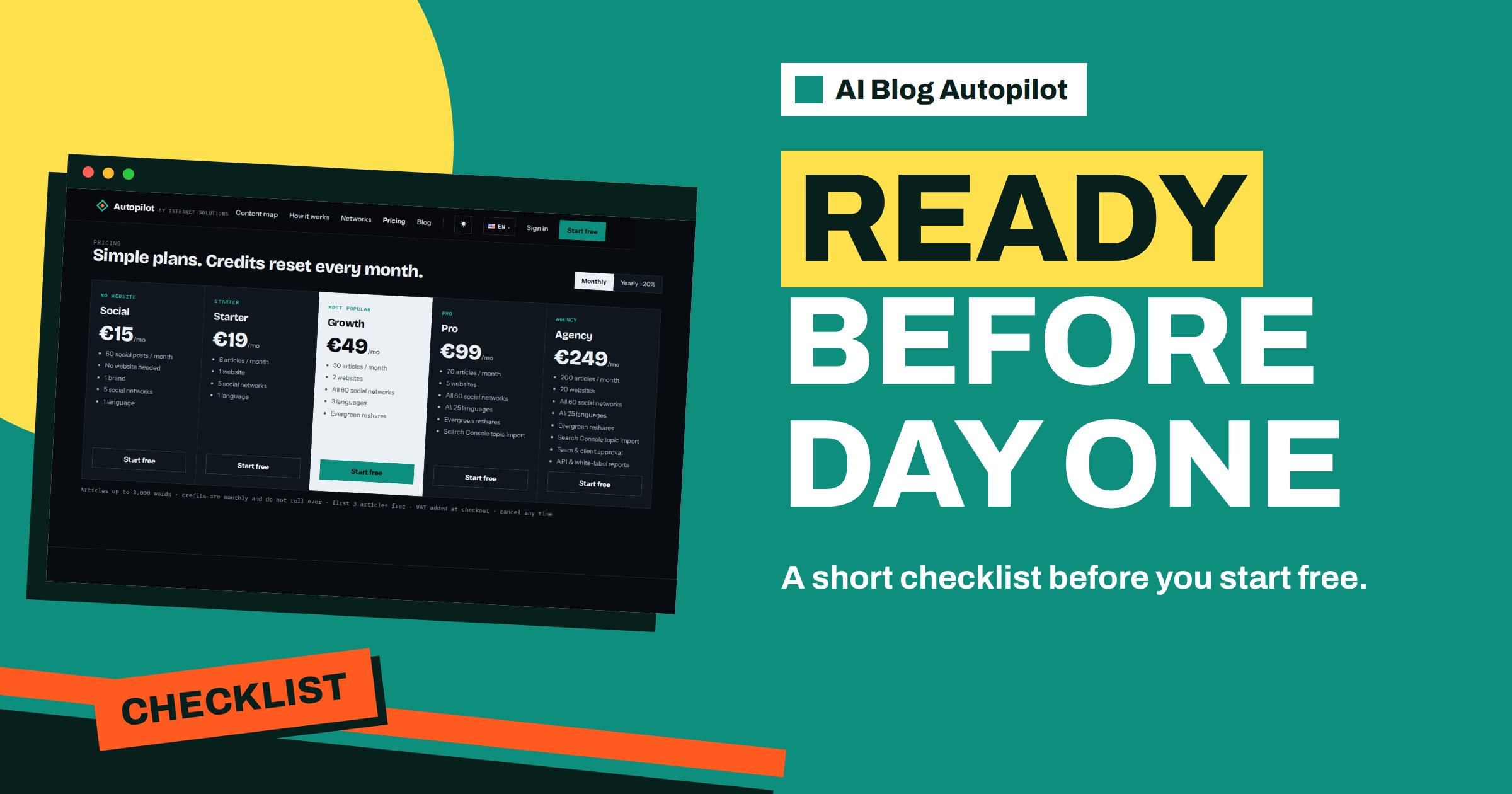
The pricing page lists the plans. For a first month, many people begin with the three free articles and then choose the smallest plan that fits, such as Starter at 19 euros with 8 articles, or Social at 15 euros with 60 social posts and no website. Credits reset every month and do not roll over, VAT is added at checkout and you can cancel at any time.
Think in terms of what you can review, not what you can afford. A plan with 30 articles is wasted if you can only read eight. The article on choosing an AI Blog Autopilot plan gives a way to decide.
Consider a short story. A small accounting practice prepares for an hour before signing up. The partner writes a description of the clients, lists seven topics from real client emails, picks a calm, plain tone, checks her WordPress login and chooses LinkedIn and Facebook as the first networks. She names the office manager as reviewer, with twenty minutes every Friday. The three free articles arrive already close to what she wanted, and only two facts need correcting. A colleague who signed up the same week with a one-line description had to rewrite his brief twice.
The lesson is that the hour before the trial is the cheapest hour of the whole project.
Prepare for the first month
Set expectations. The first articles teach you about your brief, not about the product’s limits. Plan to change the brief two or three times in the first month. Look at the content map weekly, which the home page describes as a calendar and a network matrix, with each cell linking to the live post.
Decide how you will judge success. A blog takes time to earn search traffic, so look at early signs: articles published on time, posts delivered to each network, questions from customers that mention an article and the time you spend each week. At the end of the month, decide whether to continue, adjust or change plan.
A one-page version to print
Condense everything above into a single page you can keep next to the screen. Write the business description in three sentences. List five to eight topics with keywords and weights. Add the audience in one line and the tone in three words. Note the path: WordPress with the login ready, or social-only with the profiles ready. List the networks and the language. Name the reviewer, the time of the weekly review and the checks that person makes. Finally, write the plan you intend to choose and the date on which you will decide whether to continue.
Sharing this page with colleagues has a second benefit: it shows who needs to do what before the trial starts. If the owner supplies the facts, the marketer supplies the topics and the office manager reviews, everyone knows the part they play. Surprises in the first week are almost always caused by an unanswered question on this page.
One more habit helps: keep a simple “not yet” list of things you decided to leave for later, such as extra languages, more networks or a second website. Writing them down lets you start small without forgetting them, and you can add one item per month once the routine is stable.
Keep the page and update it after the first month. It becomes the living summary of how your content routine works, and it is the first thing to hand to a new colleague who joins the project later.
How AI Blog Autopilot helps
With the checklist done, the product does the rest: it writes the articles, runs the quality check, publishes the blog at your hour and sends a native post to each network. Start with the three free articles on AI Blog Autopilot, no card needed, and see the plans on the pricing page.
Related reading
- Connect WordPress in One Click
- Setting Up Topics in Autopilot
- The First Three Free Articles: How to Use Them Well
The bottom line
Prepare a short business description and fact sheet, five to eight weighted topics, a clear audience and tone, your WordPress access or social-only choice, your networks and languages and a review habit, then use the free articles to test your brief.
FAQ
How long does the preparation take?
About an hour is enough for most small businesses, and it improves the three free articles a lot.
Do I need a card to start?
No. The home page says the first three articles are free with no card.
Can I change my topics later?
Yes. Plan to adjust the brief in the first month as you see what the articles look like.
Should I start with approval or AUTO?
AUTO is the default, but approval is a sensible choice for the first month. It can be switched on any time.
What if I do not have a website yet?
Start social-only and add a blog later. Your plan moves with you.