ENEnglish
 LTLietuviškai
 DEDeutsch
 FRFrançais
 RUРусский
 ESEspañol
 PLPolski
 ITItaliano
 UKУкраїнська
 CSČeština
 PTPortuguês
 JA日本語
 LVLatviešu valoda
 ETEesti
 HUMagyar
 IDBahasa Indonesia
 TRTürkçe
 HIहिन्दी
 ELΕλληνικά
 ARالعربية
 THไทย
 VITiếng Việt
 RORomână
 MSBahasa Melayu
 BNবাংলা
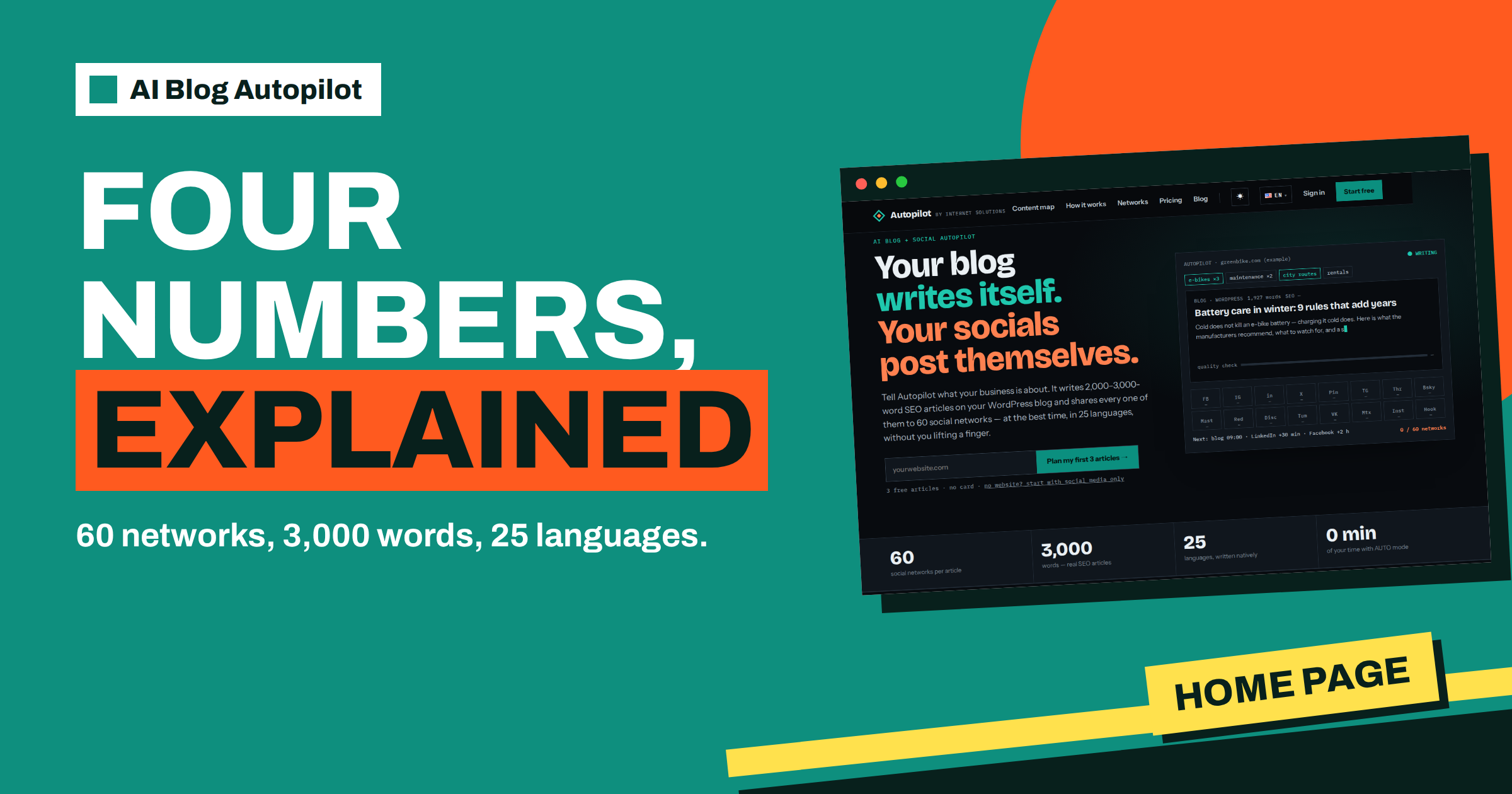
Short answer: The AI Blog Autopilot home page shows four headline numbers: 60 social networks per article, 3,000 words per article, 25 languages and 0 minutes of your time with AUTO mode. Each number is a ceiling or a design goal, not a promise of results. Your plan decides how many articles, websites and languages you actually get.
Headline numbers are easy to skim and easy to misread. A reader sees 60 and imagines sixty posts on sixty platforms every day. Another sees 3,000 and assumes every article hits that length. Reading them correctly helps you choose a plan, set expectations and avoid disappointment.
This guide walks through each number on the home page, explains what it means in practice and shows how it connects to the plans on the pricing page. The facts come from the home page, the networks page and the pricing page. Where the site does not say something, this article does not guess.
60 social networks per article
The first number says every article can be shared to 60 social networks. The word to notice is can. The number describes the full list of networks that Autopilot supports, grouped on the networks page into social networks, messaging channels, team chats, blogs and publishing platforms, and read-later and automation tools. It does not mean that every account is connected from day one.
You choose which networks to connect. The Social and Starter plans list 5 social networks. Growth, Pro and Agency list all 60. So the number matters most when you compare plans: a five-network plan is a focused set, while the larger plans open the whole list.
The home page also says each network gets its own text, length and time. That is the real meaning of the number. It is not sixty copies of one link. It is a separate post prepared for each connected network, which is why a connected network count is a useful measure of reach, not a measure of effort.
Most businesses never need sixty. A local trade may do well with two or three networks where customers already spend time. A software company might add team chats and a developer blog. The right number is the number your audience uses.
3,000 words per article
The second number is the article length. The home page describes 2,000 to 3,000-word SEO articles, and the pricing page repeats that articles are up to 3,000 words. The range matters: this is a ceiling, and a typical article sits inside the range, not always at the top of it.
Why long articles? The home page says this is the length that actually ranks, planned around a real search query, with FAQ, tags and SEO meta. A long article has room to answer a question in full, cover related questions and give a reader a reason to stay. It also gives the quality check enough to measure for structure and keyword use.
Length alone is not quality. A 3,000-word article that repeats itself is worse than a clear 1,500-word one. The product pairs length with a quality gate that checks length, structure, keyword and meta, and holds weak articles for review. Read the article on the quality gate for what is checked before publishing.
For your own planning, remember that long articles take readers time. Plan topics that deserve depth, such as guides, comparisons and answers to common questions, and keep short announcements for social posts.
25 languages
The third number is the language count. The home page says each article is written directly in its language, not machine-translated from English. The pricing page then sets how many languages each plan includes: 1 language on Social and Starter, 3 on Growth and all 25 on Pro and Agency.
So the number has two readings. As a product fact, it tells you that a business in Poland, Brazil or Japan can publish in its own language. As a plan fact, it tells you that most customers choose one or three. A single-language blog is often the right start, because it concentrates effort and makes results easier to read.
Choose a language by audience, not by ambition. If your customers read and search in one language, write in it. Add a second only when you can serve those readers, for example with a contact route in their language. The article on connecting WordPress shows the setup that comes before language choices.
Do not assume that more languages mean more traffic. Each language is a separate audience with its own searches, and it needs topics that make sense there.
0 minutes of your time with AUTO mode
The fourth number is the boldest. The home page says AUTO mode takes 0 minutes of your time, and describes AUTO as the default: planning, writing, quality check, publishing and sharing run without manual steps, with no queue to approve and no daily log-ins.
Read it as a design goal about required steps. In AUTO mode, nothing waits for you to click. It does not forbid you from looking. Many owners still open the content map once a week to see what was published, and that choice is yours. The product does not need that visit to keep working.
Approval is optional for anyone who wants to see each article first. A careful business, such as a clinic or a law practice, can switch it on and move to AUTO later. The article on moving from approval to AUTO gives a four-week plan.
One setup task sits before the zero: you describe the business and its topics. That is a one-time effort with periodic tuning, and it is where your time pays off most.
The numbers that live on the pricing page
The home page numbers describe the product at its widest. The pricing page gives the numbers that decide your bill: Social at 15 euros a month for 60 social posts with no website needed, Starter at 19 euros for 8 articles, Growth at 49 euros for 30 articles and 2 websites, Pro at 99 euros for 70 articles and 5 websites, and Agency at 249 euros for 200 articles and 20 websites.
Notice how the numbers scale together. More articles come with more websites, more networks and more languages. Pro and Agency add Search Console topic import, and Agency adds team and client approval and API and white-label reports. Prices are in euros per month, VAT is added at checkout, and yearly billing shows a 20 percent reduction.
Credits are monthly and do not roll over. If you choose 30 articles a month and publish 12, the other 18 do not carry into the next month. Pick the plan for the number you will really use, and see the article on planning your monthly credits for a method.
How to turn the numbers into a plan
Start from the output you want, not from the biggest number. Decide how many articles a month your blog can carry, which networks your readers use and in how many languages you can serve them. Then match those answers to the plan table.
A small business with one website and a steady local audience will often land on Starter: 8 articles, 1 website, 5 networks, 1 language. A business without a website can begin with Social. A growing business with two sites or a second language can look at Growth. An agency with many clients looks at Pro or Agency.
Write the choice down with a date, and review it after a few months. The article on choosing an Autopilot plan compares the plans in more detail, and the three free articles give you a way to test the output before you decide.
Reading the numbers as a team
If more than one person is involved in the decision, share the numbers in a simple table before anyone argues about price. Put four columns side by side: articles a month, websites, networks and languages. Under each, write what the business needs today and what it might need in six months. The gap between the two columns shows whether you are buying for the present or for a hope.
Ask each person one question. The owner decides how much attention the blog should get, the marketer lists the topics worth a long article, and the person who runs the social profiles names the networks that already bring customers. Their answers usually point to the same plan, and the disagreement, if any, is useful to see early.
Revisit the table every quarter. A business that started with one language and five networks may find after a few months that a second website or a wider network list is worth the step up.
What the numbers do not say
It is worth stating the gaps. The home page does not promise a ranking, a traffic figure, a follower count or a number of sales. It does not say how fast a new blog grows. It does not publish fees for payment methods or processing times. A number about capacity is not a number about outcome.
That is normal for a tool. The product supplies the planning, writing, checking, publishing and sharing, and your results depend on your topics, your market, your site and your patience. Judge success with your own measures: visits to key pages, enquiries, mentions from customers and steady publishing over several months.
Keep your own scorecard. A simple monthly note of articles published, networks active and enquiries received will tell you more than any headline number. The content map helps here, because it lists every article and every post in one place.
How AI Blog Autopilot helps
The four numbers describe what Autopilot can do. Your first three articles show what it does for your business, with no card needed. Create a free account on AI Blog Autopilot, describe your topics and compare the plans on the pricing page when you are ready.
Related reading
- Choosing an AI Blog Autopilot Plan: Social to Agency
- Your First 3 Free Articles in AI Blog Autopilot: A Walkthrough
- How to Read the AI Blog Autopilot Content Map
The bottom line
The home page numbers are ceilings and goals: 60 networks, up to 3,000 words, 25 languages and 0 required minutes in AUTO mode. Your plan sets the real limits, so choose by what you will use and judge results with your own measures.
FAQ
Does Autopilot post to all 60 networks automatically?
No. You connect the networks you want. Social and Starter list 5 social networks, and Growth, Pro and Agency list all 60.
Is every article 3,000 words long?
The home page describes 2,000 to 3,000-word articles, and the pricing page says up to 3,000 words, so 3,000 is the upper end of the range.
Are all 25 languages included in every plan?
No. The pricing page lists 1 language on Social and Starter, 3 on Growth and all 25 on Pro and Agency.
What does 0 minutes with AUTO mode mean?
AUTO is the default mode and runs planning, writing, checking, publishing and sharing without manual steps. You may still look at the content map whenever you like.
Do the numbers promise rankings or traffic?
No. They describe capacity and features. Results depend on your topics, your market and how long you publish.