ENEnglish
 LTLietuviškai
 DEDeutsch
 FRFrançais
 RUРусский
 ESEspañol
 PLPolski
 ITItaliano
 UKУкраїнська
 CSČeština
 PTPortuguês
 JA日本語
 LVLatviešu valoda
 ETEesti
 HUMagyar
 IDBahasa Indonesia
 TRTürkçe
 HIहिन्दी
 ELΕλληνικά
 ARالعربية
 THไทย
 VITiếng Việt
 RORomână
 MSBahasa Melayu
 BNবাংলা
Short answer: AI Blog Autopilot lists card payments (Visa, Mastercard, Google Pay and Apple Pay), a PayPal subscription, Bitcoin through BTCPay, bank transfer, Western Union and MoneyGram. Prices are in euros with VAT added at checkout, and you can cancel any time. Pick the method that fits how your business pays for software, and keep the receipts for your accounts.
Many software products accept only a card. That is a problem for freelancers without one, for companies that pay by invoice and for customers in countries where international card payments are hard. A wider list of payment methods removes one of the most common reasons for abandoning a sign-up.
This guide explains the methods that AI Blog Autopilot lists, who each suits and what to check before you pay. The facts about the list come from the product notes on the site. For anything specific to your account, such as what is offered at checkout for your country, check the checkout itself, because the list can change.
The methods the product lists
The product notes list six ways to pay. The first is a card, with Visa, Mastercard, Google Pay and Apple Pay named. The second is a PayPal subscription. The third is Bitcoin, handled through BTCPay. The remaining three are bank transfer, Western Union and MoneyGram.
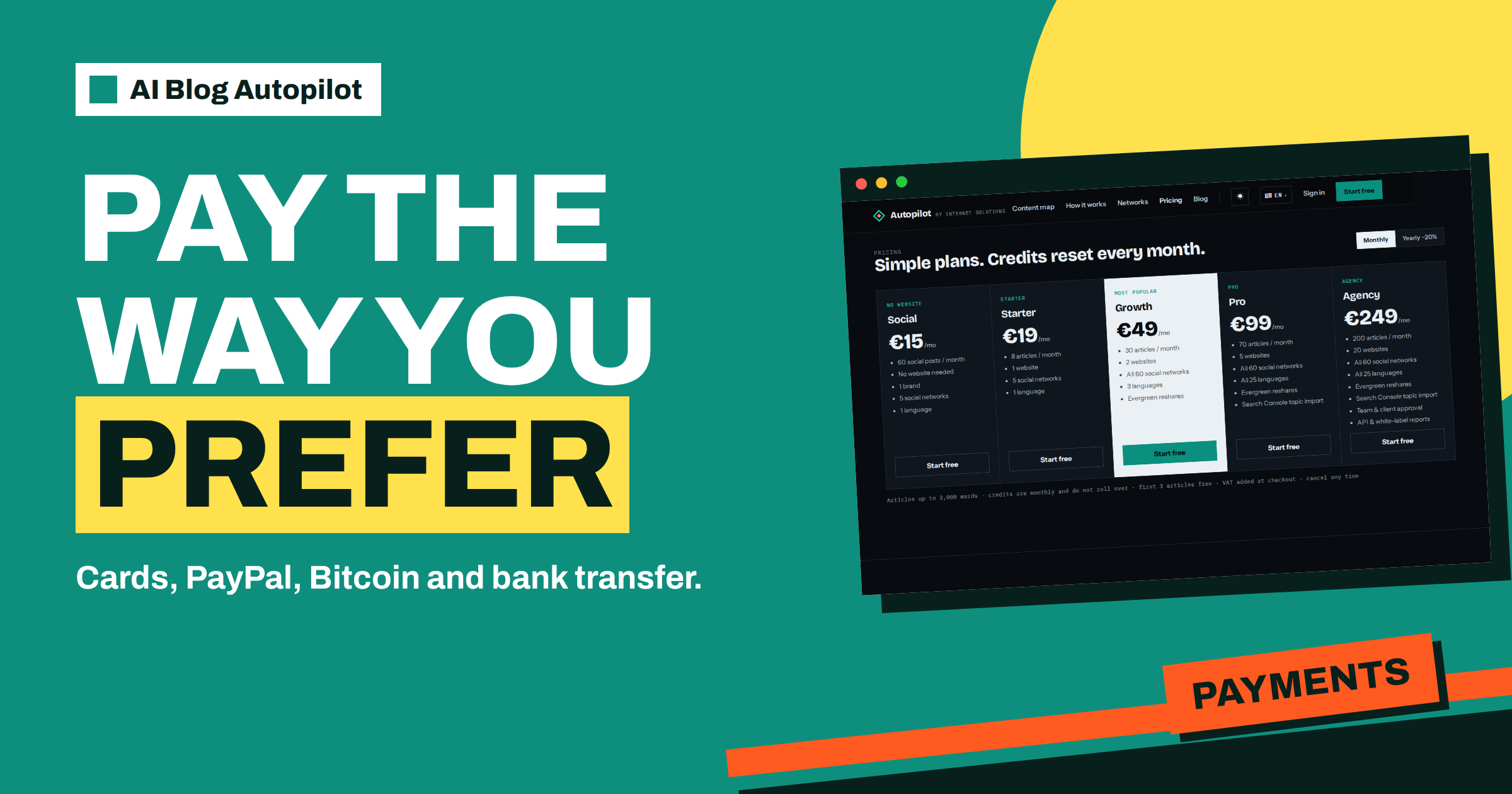
The pricing page adds the general terms. Plans are priced in euros per month, VAT is added at checkout, credits are monthly and do not roll over, and you can cancel any time. The first three articles are free, and the home page says no card is needed to start, so you can try the product before you choose any payment method.
It is worth saying what this article does not claim. It does not describe fees, exchange rates or processing times, because the site does not publish them. Where those matter to you, ask the payment provider or the support address before you commit.
Paying by card or wallet
A card is the quickest route and the one most people use. Visa and Mastercard cover most bank cards, and Google Pay and Apple Pay let you pay from a phone wallet, so you do not type the card number. For a business, a company card keeps software costs in one place and makes monthly reconciliation simple.
Think about which card to use. A card in a personal name mixes business and private spending. A company or virtual card with a spending limit is neater, and it stops a forgotten subscription from becoming a large charge. If your card expires or is replaced, update the details before the next payment date, so that your credits are not interrupted.
Cards from some countries are declined for foreign payments, because the bank treats a euro charge as international. If that happens, try another method, such as PayPal, instead of repeating the attempt many times.
Paying with PayPal
PayPal suits people who already keep a balance or a linked bank account there, and those who prefer not to share card details with every service. The product lists a PayPal subscription, which means a recurring arrangement that you can see and manage in your PayPal account.
A subscription managed in PayPal has an advantage for small businesses: the list of agreements is in one place. If you review your software costs every quarter, you can see every active subscription and cancel those you no longer use. Note the date of the first payment, so that you can match it with your invoice.
If you stop using Autopilot, remember that cancelling in the product and managing the subscription in PayPal can be separate steps in many services. Check both, so that you are not charged for a plan you no longer use.
Paying with Bitcoin
The product lists Bitcoin through BTCPay, an open-source payment processor. Crypto payment suits customers who hold Bitcoin for business reasons, who live where card payments are hard or who prefer not to use a bank. It is also a useful fallback when a card fails.
Take care with the practical details. A Bitcoin payment is made from a wallet, and the amount and any network fee are set by the network, not by the product. Check the amount shown at checkout, send exactly that amount and keep the transaction record. Do not send a payment from an exchange account that does not let you control the details, since a mistake can be hard to correct.
Also think about your accounting. For a business, a crypto payment still needs a receipt that shows the date, the euro amount and the service paid for. Keep the checkout page and the transaction identifier together with your bookkeeping records.
Bank transfer, Western Union and MoneyGram
Bank transfer suits companies that pay by invoice and want a clear record in their bank statement. Western Union and MoneyGram are money-transfer services, listed for customers who pay in cash or who cannot use a card or an online wallet. They are slower and more manual than a card, so allow time and follow the instructions at checkout exactly.
Because these methods involve a person sending money and reference details, accuracy matters. Use the reference or payment details exactly as shown, so that the payment can be matched to your account. If a payment does not appear after a reasonable time, write to the support address on the contact page, with the date, the amount and the proof of payment.
For a business that is invoiced in euros, check how your bank handles currency. If your account is in another currency, a bank transfer may include conversion charges on your side, so compare that cost with a card payment before you choose.
VAT, invoices and records
The pricing page says VAT is added at checkout. For a business, it is good practice to enter your company details and tax number if the checkout asks for them, because it is hard to change an invoice afterwards. Check the invoice you receive against your records, and store it with the date and the plan.
Keep a simple software register with columns for the product, the plan, the monthly price, the payment method and the renewal date. Review it every quarter. The article on planning your monthly credits explains how to match the plan to the articles you will use, which is the other half of controlling the cost.
If an accountant prepares your books, send them the invoice each month, or give them access to the folder. A tidy record of what was bought, when and how it was paid saves time at the end of the year.
Common payment problems and how to avoid them
Most payment problems are small and avoidable. A card is declined because of a foreign-payment block, a spending limit or an expired date. A transfer is delayed because the reference is missing. A subscription is charged again because nobody noted the renewal date. A receipt goes missing because it was sent to an inbox that nobody reads.
Prevent these with three habits. First, use a shared mailbox or a finance address for receipts, not one person’s inbox, so that invoices survive staff changes. Second, put the renewal date in a calendar with a reminder a few days before. Third, keep a note of which method is attached to which plan, so that anyone can answer the question without searching.
If something does go wrong, gather the facts before you write: the date, the amount, the method, the plan and a screenshot or receipt. A short message with those details is much easier to answer than a general complaint. Use the address on the contact page, and keep the reply with your records.
One more precaution is worth taking. Pay only on the official checkout of the product, reached from the site itself. Be careful with messages that ask you to pay by transfer to details you were sent by email or chat, since fake payment requests are a common scam. If a request looks unexpected, go to the site, sign in and check your account instead of replying.
Choosing a method that fits
Start from your situation. A freelancer with a card and a PayPal account will probably use whichever is easiest. A company with a finance team may want a bank transfer and an invoice. A customer whose card is declined can try PayPal or Bitcoin. Someone without any online account can use a money-transfer service.
Whatever you choose, test the process with the cheapest plan or after the free trial, and note how long it takes for your account to show the plan. If you plan to change plans later, repeat the check, since the process may differ. The article on choosing an AI Blog Autopilot plan explains the plans themselves.
Finally, think about resilience. If one method fails, another keeps your blog running. Having a second method in mind, such as PayPal beside a card, means a declined card does not stop the schedule. Decide who in your team may change payment details, and write it down, so that an urgent fix does not wait for the one person who knows the password.
How AI Blog Autopilot helps
Autopilot lists six payment routes, prices every plan in euros and starts with three free articles, so you can judge the product before you pay. Create a free account on AI Blog Autopilot, no card needed, and compare the plans on the pricing page.
Related reading
- Choosing an AI Blog Autopilot Plan: Social to Agency
- Planning Your Monthly Credits in AI Blog Autopilot
- Your First 3 Free Articles in AI Blog Autopilot: A Walkthrough
The bottom line
Choose the payment method that fits how you already pay for software, keep a receipt for every payment and have a second method ready. Try the three free articles first, because no card is needed to start.
FAQ
Which payment methods does AI Blog Autopilot list?
Card payments (Visa, Mastercard, Google Pay and Apple Pay), a PayPal subscription, Bitcoin through BTCPay, bank transfer, Western Union and MoneyGram.
Do I need a card to start?
No. The home page says the first three articles are free with no card needed. You choose a payment method only when you pick a plan.
Is VAT included in the price?
The pricing page says VAT is added at checkout, so the price shown for a plan is before VAT.
Can I cancel any time?
Yes, the pricing page says you can cancel any time. Credits are monthly and do not roll over, so use them before the month ends.
Which method is best for a company?
Many companies prefer a company card or a bank transfer with an invoice, because it keeps records tidy. Check what checkout offers for your country.